 Nexcubator
Blog · 11 October 2026 · 12 min read
The Calendar That Understands You: How nex-cal Plans Your Week
This post introduces Plan my week and Book the role in nex-cal, Nexcubator's calendar and booking app. For the whole picture, read What Is Nexcubator?
It is Sunday evening. Next week already has fifteen meetings in it.
The work that actually moves the business is somewhere else: six to-dos with dates on them, a task in Doing on the website project, another on the app project, a third waiting on a client. None of it has a time. So it waits for the gaps, and the gaps get eaten by the next meeting request.
Nobody planned it that way. The calendar only knows about meetings, and the work lives in other tools.
In short:
- The problem: calendars hold meetings, while the work sits on to-do lists and project boards with no time set aside for it.
- nex-cal reads all of it: your to-dos, and the tasks assigned to you on every board in nex-orbit, Nexcubator's project management app.
- One tap plans your week. Every piece gets time before it is due, around your meetings, and every block says why it is where it is.
- It learns your routine from the focus time you actually kept over the last six weeks. Only you see it.
- Change it, or just say it. Pick another way nex-cal suggests, or type "keep Friday afternoon free" and the week re-plans.
- It adjusts automatically when life happens, and nothing goes in your calendar until you say so.
- Book the role: one booking link for a team, where nex-cal works out who takes each booking from leave, holidays and working days.
About the visuals: these are real nex-cal screens. The company, the people and the work in them are invented.
Why the work waits
A calendar shows you when you are busy. It has never known what you are busy with.
| What usually happens | Why | What it costs |
|---|---|---|
| Tasks sit on a list with a due date and no time | The list and the calendar are separate tools | Work gets done late at night, or late |
| Project tasks live on boards nobody's calendar can see | Each board is its own world | The most important work is the least planned |
| Time blocks are made by hand, then abandoned | Re-planning a week by hand takes longer than the work | Plans stop matching reality by Tuesday |
| A new meeting lands on your focus time | The calendar treats everything as movable | Focus time is the first thing lost |
A week at Harbour Works: an illustrative case study
Harbour Works is an invented design agency, and Nora Byrne its invented founder. The screens are real nex-cal screens with her invented week in them.
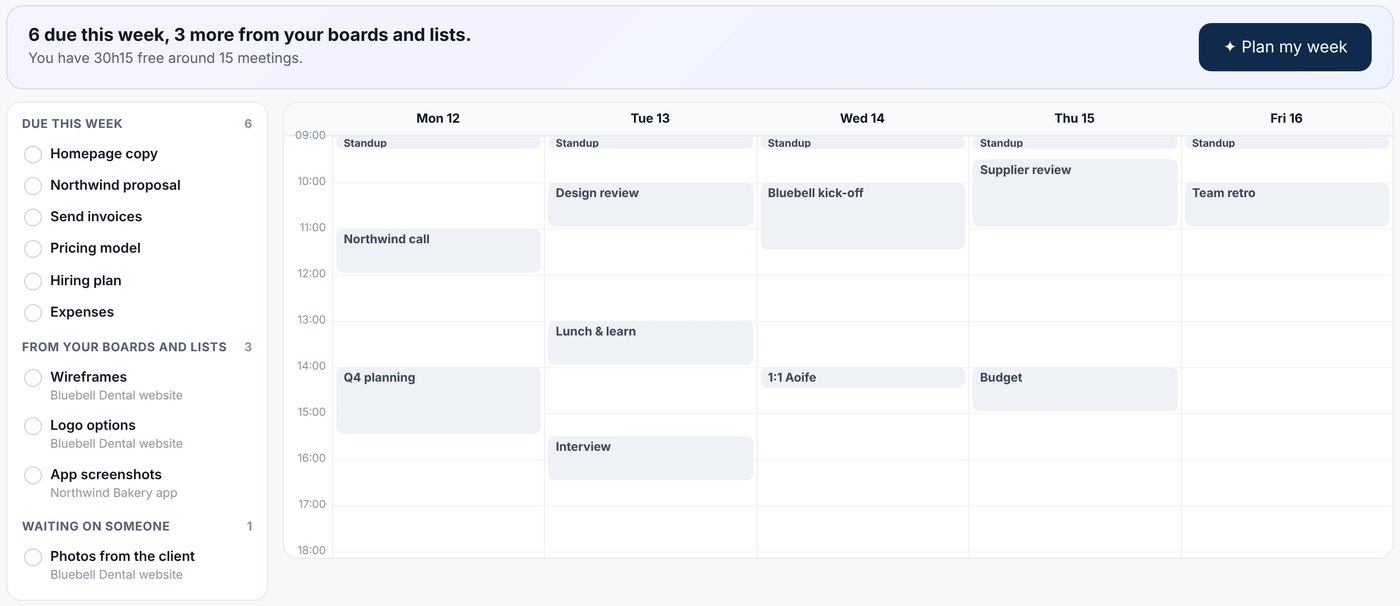
On Sunday, Nora opens Plan my week. On the left is everything on her plate: six to-dos due this week, three tasks assigned to her on two boards (Bluebell Dental website and Northwind Bakery app), and one task waiting on a client. On the right is her week: fifteen meetings, and 30 hours 15 free around them.
She presses Plan my week. The week fills: all six to-dos placed before they are due, plus first stretches of time for the three tasks. The task that is waiting on the client is shown but not planned.
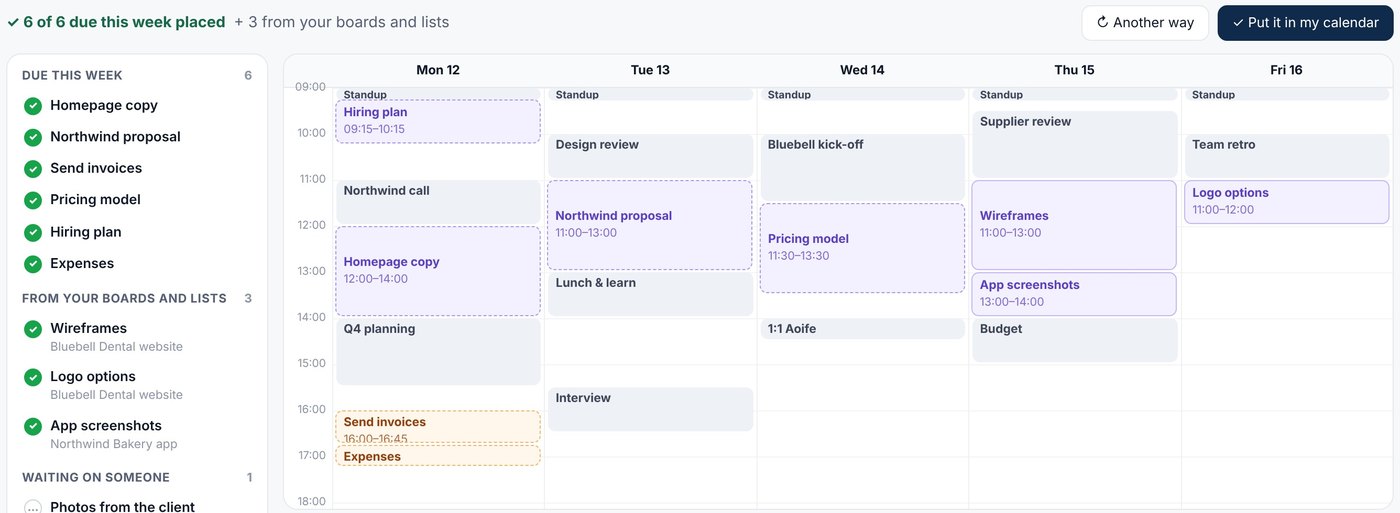
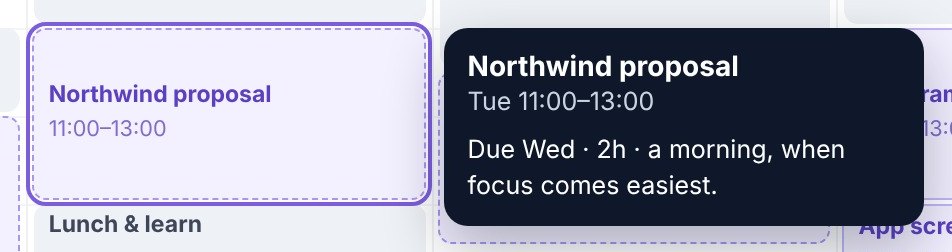
She taps the Northwind proposal to see why it is on Tuesday at 11:00: due Wednesday, two hours, a morning, when focus comes easiest.
She wants it different: the proposal done on Monday, the work spread out, and Friday afternoon kept free. So she types exactly that. nex-cal re-plans, and says in one line what it understood.
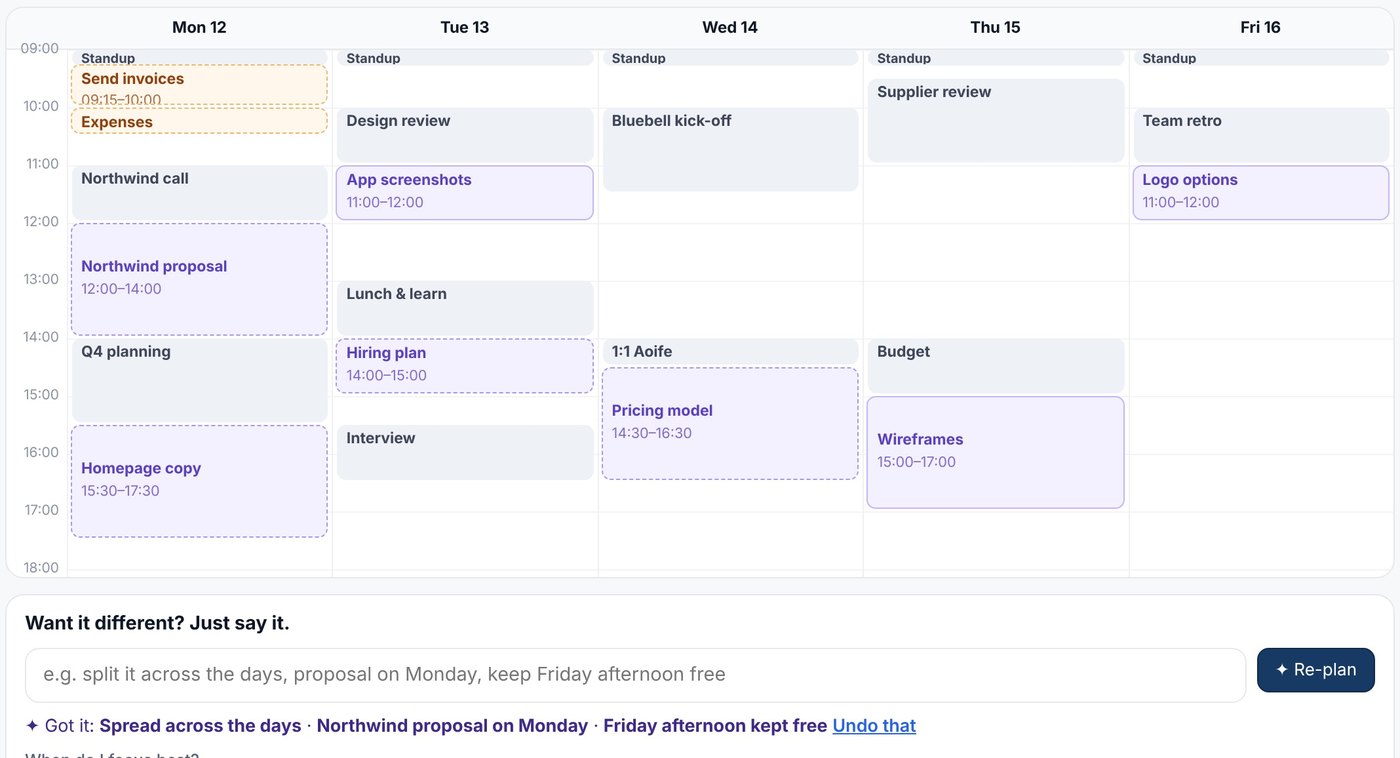
She presses Put it in my calendar. On Wednesday, a client call lands on her pricing-model block. Nothing reshuffles behind her back: the block waits, and nex-cal offers a better time. When she skips sending the invoices on Thursday, they are not lost; the next plan picks them up first.
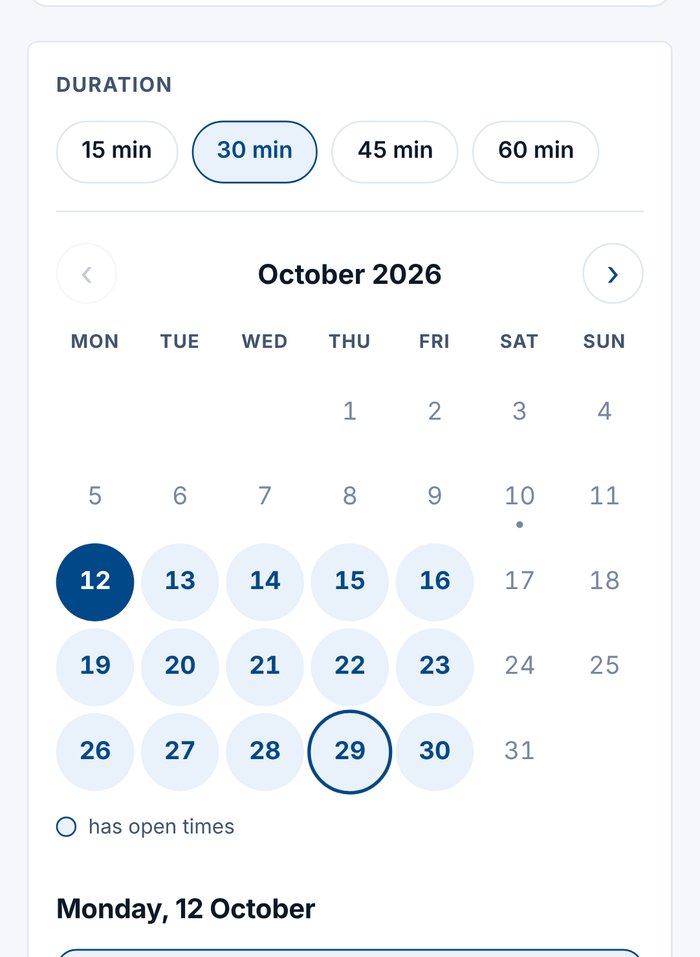
Meanwhile, guests who want to talk to a designer book through the team's single link. Liam is on leave until Wednesday, so Aoife and Grace take those bookings, and each guest sees who they will meet before they book.
The intelligence behind Plan my week
nex-cal is not one clever trick. It is a set of plain, readable steps, each one deciding a small thing well.
1. It reads all your work, not just your list
The idea: what is on your plate is everything assigned to you, wherever it lives.
- To-dos due in the next seven days must get time before they are due.
- Project tasks assigned to you on any board come next, ranked by what you are already doing, then priority, then due date. A task with no date this week gets a first stretch of up to three hours when there is room, rather than eating the whole week.
- Tasks waiting on someone else are shown, never planned: there is nothing you can do on them yet.
- What slipped comes first. An overdue to-do is marked as slipped and planned ahead of everything else.
2. It knows how long things really take
Every block starts from the length you gave it, or the task's estimate. After three to-dos logged in nex-track, it uses how long yours really take: if your two-hour jobs usually take three, it plans three. It also tells work apart by kind: deep work (long, hard thinking), normal work, and admin (short jobs and words like invoices or expenses).
3. It only uses time that is really free
Free time is your open hours, minus your meetings, minus anything you asked to keep. You can keep the last hour or two of each day free for bookings, and add your own rules: finish by four on Fridays, deep work before one, thirty minutes between blocks, no focus work on Wednesdays. Long work that will not fit in one stretch is split into parts of at least thirty minutes, in the best places first.
4. It learns your routine
The idea: your best hours are the ones you actually keep, not the ones you wish you kept.
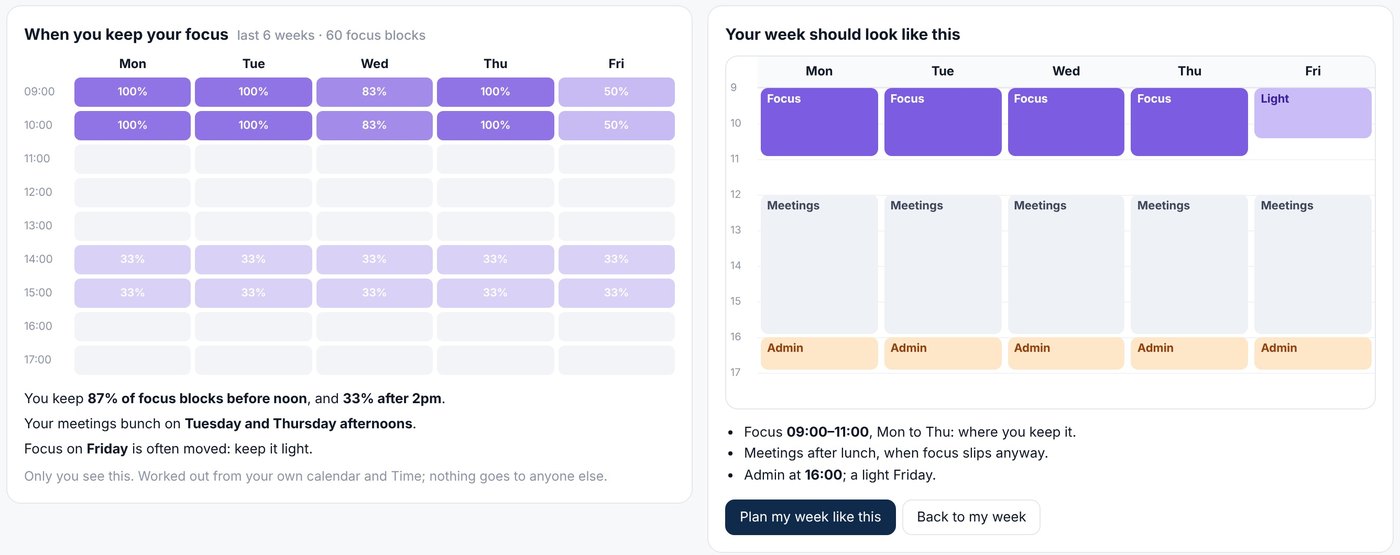
nex-cal looks at the focus blocks you planned or blocked over the last six weeks, and at which ones you kept where you put them, hour by hour. Moved or cancelled blocks count against that hour; a plan you took back with Undo does not count at all. It needs at least eight focus blocks before it says anything, and it only quotes a figure for hours it has history for.
From that it suggests the week that suits you: focus in the hours you keep it, meetings after lunch, an admin hour, a light day if one keeps getting moved. Only you see this. It is for planning your own week, never for judging anyone's.
5. Every block says why
Each block carries its reason in plain words: when it is due, how long it should take, and why it is at that time, such as "your best focus hours (you keep 87% here)" or "Tuesday is the lightest day for it". Tap a block, or the task on the left, to read it.
6. Change it: another option from nex-cal
Not right? Another way re-plans the same work in a different style: hard work in your best hours, spread across the days, everything as early as it fits, or afternoons kept free for people. Each block moves to its new place, one at a time, saying where and why.
7. Or just say it, in plain English
Type what you want in the box under your week: "split it across the days, Northwind proposal on Monday, keep Friday afternoon free". nex-cal understands three things, re-plans, and shows them in one line, with Undo that beside it.
This is where AI earns its place, and where it is kept on a short lead:
- The AI only translates your sentence into settings. It never plans the week and never writes the words you see. The planning is done by the same plain rules as before, and every word on screen is written by the app.
- It is sent your sentence and the titles of your own work, numbered. Never your calendar, meeting titles, times, names or anybody else's work.
- Every value is checked. A day that is not a weekday, an hour outside the day or a task that is not on your list is dropped, never guessed.
- When no AI is chosen, plain rules read the sentence instead, and they understand the common requests on their own.
- A day for one task, or an afternoon kept free, lasts one week. Your lasting preferences stay until you remove them.
8. It adjusts automatically when life happens
- A meeting lands on a focus block? nex-cal never moves the meeting, and never silently moves your work either. The block waits, and a better time is offered with one tap.
- You skip a task? It is marked as slipped and planned first next time, so nothing quietly disappears.
- Your week changed while you were looking? nex-cal says so, and shows the plan as it is now, before anything goes in.
- One tap puts it in your calendar, and one tap takes it out again for a week afterwards. Colleagues only ever see that you are busy.
Book me, and book the role
Planning your own week is half of a calendar's job. The other half is letting other people find time with you, and that has its own intelligence.
Your own booking page. Guests pick a time inside your open hours, around your meetings and the focus time you have put in your calendar. They can be asked to confirm their address with a short code, and they can move or cancel the booking themselves. Bookings land in your calendar like any other meeting, so your plan works around them.
Book the role, not the person. A team booking page is one link for a team, a job title or a list of people, such as "Talk to a designer". nex-cal works out who takes each booking from what Nexcubator already knows about your people, so nobody keeps a rota by hand:
- The days each person works, and their approved leave.
- Public holidays where each person works, so a colleague in Belfast and one in Dublin are not off on the same days.
- New starters can wait two weeks before taking bookings; leavers' bookings are listed to hand over, and the guest is told who they will meet instead.
- Fairest first: when two people are free, whoever has had fewer bookings through the page takes it. Or simply take turns.
- It cannot double-book anyone. A team booking lands in the diary of the person taking it, in the same time slots as their own meetings.
The page shows its reasoning in sentences before a guest ever arrives: "Liam is on leave on Monday 12 Oct; Aoife and Grace take it."
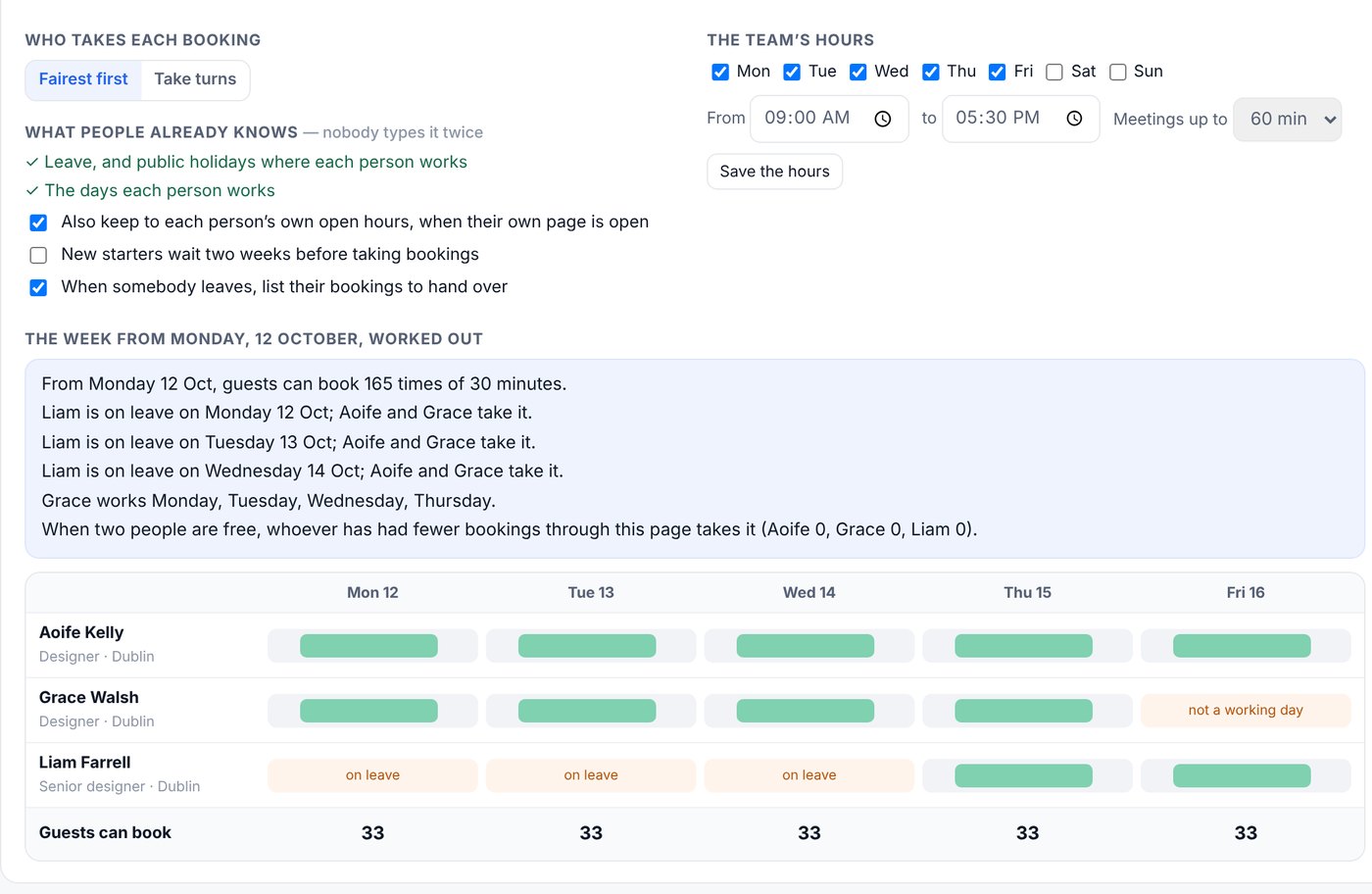
The guest sees who they will meet before they book, and each person's own page can point to the team with "Or talk to the team".
What is new here
| Most calendars and planners | nex-cal |
|---|---|
| Know your meetings, not your work | Read your to-dos and the tasks assigned to you on every project board |
| Make you build time blocks by hand | Plan the week in one tap, before each due date |
| Use the time you hope something takes | Use how long your work really takes, from your own logged time |
| Treat every hour the same | Learn the hours you actually keep focus, privately |
| Move things without telling you | Say why every block is where it is, and change nothing until you tap |
| Need settings screens to change the plan | Re-plan from a sentence in plain English, with Undo |
| Book one person, or a round-robin that ignores leave | Book a role, worked out from leave, holidays and working days |
The principle underneath: your plan, your call
- Nothing goes in your calendar until you say so, and everything can be undone.
- Every decision is explained in plain words you can check.
- AI understands your words; rules do the planning. The part that has to be right every time is ordinary code that behaves the same way every time.
- Your focus history is yours. Only you see it, and it is used to plan your week, never to assess you.
You can see the booking side on the Booking page and how it fits the rest of Nexcubator in How it works.
Frequently asked questions
Does nex-cal change my calendar automatically?
It plans automatically, but it never writes to your calendar without you. You see the whole plan first, every block explains itself, and one tap puts it in your calendar. One tap takes it out again for a week afterwards.
Where does nex-cal get my tasks from?
From your to-dos in nex-cal and from the tasks assigned to you on every board in nex-orbit, Nexcubator's project management app. Tasks waiting on someone else are shown but not planned.
How does it know when I focus best?
From your own calendar: the focus blocks you planned or blocked over the last six weeks, and which of them you kept where you put them. It needs at least eight before it says anything. Only you can see the result.
What does the AI see when I type a request?
Only the sentence you typed and the titles of your own to-dos and tasks for that week. It never sees your calendar, meeting titles, names or anybody else's work. It turns your sentence into settings; the planning and every word you see are done by the app.
What happens when a meeting lands on my focus time?
The meeting stays where it is and your block waits. nex-cal offers a better time for the block, and you move it with one tap.
How does a team booking page decide who takes a booking?
Of the people free at that time, it takes into account the days they work, their approved leave and the public holidays where they work, then gives the booking to whoever has had the fewest through the page, or simply takes turns. The guest sees who they will meet before booking.
Related reading
- What Is Nexcubator?: the ideas behind Nexcubator and all its apps.
- Time, costs and billing: nex-track, where nex-cal learns how long your work really takes.
- Booking: the booking pages feature.
- Your Business Runs on Twelve Apps: why separate calendar, task and project tools cost more than they look.
Where it stands
Plan my week and Book the role are part of nex-cal, Nexcubator's calendar and booking app, and are available in the beta now, alongside nex-orbit for projects and nex-track for time.
If your calendar is full of meetings and your real work happens after hours, this is the conversation we want to have.
Nexcubator is business software by Aitina Tech. Book a demo and see your own week planned.
Nexcubator is built on two Aitina Tech frameworks: Software as a Capability and OKL. The engineering practice behind posts like this one is AI harness engineering.
This is the product it came out of.
Nexcubator runs jobs, people, time and money in one place, hosted in the EU or in your preferred region. Free during early access.
Request early access More posts