 Nexcubator
Blog · 3 November 2026 · 10 min read
From a Customer's Ticket to Your Team's Day: nex-orbit With nex-help
This is part 4 of 4 on nex-orbit, Nexcubator's project management software. Part 1, Stop Chasing, Ask the Project, covers the board. Part 2, Plan, Sprint, and See What Really Happened, covers the plan. Part 3, A Standup Drafted From Your Work, covers the daily rhythm. For nex-help itself, read The Intelligent Help Desk.
When a customer reports a problem, how long before the person who can fix it hears about it? Does your help desk know which project the customer's work belongs to? And when the fix is done, who remembers to tell the customer?
In most companies the help desk and the project tool are two islands. A ticket arrives in one; the work is done in the other; and the bridge between them is somebody copying a link into a chat. Things fall in the water.
The solution: one ticket, followed into the team's day
- The ticket knows its project. A customer's projects are linked on the desk, and the ticket can follow that project's workflow.
- On the project's board, linked both ways. One click puts the ticket's work on its project's board as a task that opens the ticket, and the ticket shows where that task stands.
- From ticket to someone's day. One click makes a task in Scheduling, due in 24 hours, with a link back to the ticket.
- In your standup. Tickets you work on appear in your standup draft, marked as support, and go only to the support desk's standup.
- Remind me on a ticket or a customer's reply brings you back to it when you said you would.
- AI drafts, a person decides. The desk agent reads and proposes, but never sends. Every reply that goes out says who approved it.
- Back to the customer. Their own requests page, a reply in one place, and service clocks that keep the promise visible.
About the visuals: the illustrations in this post are drawn to explain the ideas. Screens may change, and the company, people, tickets and figures in them are invented.
Why support and delivery drift apart
A customer emails on Monday night. The support person reads it on Tuesday, copies the details into a chat for the developers, and moves on. The developer fixes it on Thursday and closes a task somewhere else. Nobody tells the support person, so nobody tells the customer, and the customer emails again on Friday, crosser than before.
The problem is rarely the help desk or the project tool. It is the space between them.
| Where it slips | What usually happens | What it costs |
|---|---|---|
| Whose work is it | The ticket does not know which project it belongs to | Handled by whoever is free, not by who knows it |
| The hand-over | Copied into a chat or a second tool by hand | Details lost, follow-ups forgotten |
| The daily rhythm | Support work invisible in the team's standup | The team does not know who is fire-fighting |
| The promise | "We'll get back to you" with no reminder | The customer chases |
| The reply | Written from scratch, or sent by a bot | Slow, or wrong, and nobody accountable |
The people and figures in our examples are made up. The pattern is not unusual.
A ticket at Harbour Works: an illustrative case study
Harbour Works is an invented design and build studio, and Northwind Bakery an invented customer. Emily Hart, Liam Farrell, David Wilson, Aoife Byrne and Sarah Miller are invented people, and HLP-214 is an invented ticket.
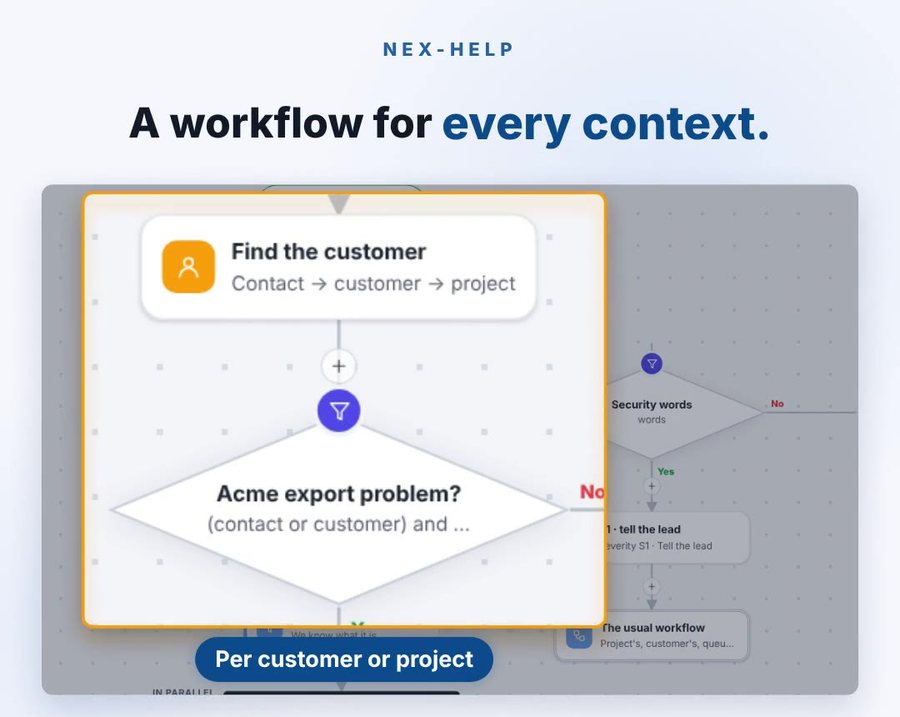
Northwind Bakery has two projects with Harbour Works: the shop fit-out and its online ordering site. On the support desk, Liam has opened Northwind Bakery's customer page and, under How their tickets are worked, linked the ordering site project and picked the studio's software workflow for it.
At ten on Monday night, Sarah Miller, the bakery's manager, emails the studio's support address: "Invoice page shows an error E-4410." Bakery staff cannot download last week's invoices from the ordering site. A ticket, HLP-214, is made. Sarah's address belongs to a contact who is in Northwind Bakery, so the ticket knows its customer. The ticket is set to S2, and its first response clock starts.
Overnight the desk agent reads it. It does not reply to anyone. It prepares a brief with what it found, cites where it found it, drafts a reply, and makes two proposals: Put it in the project Northwind ordering site, and Make a task in Scheduling.
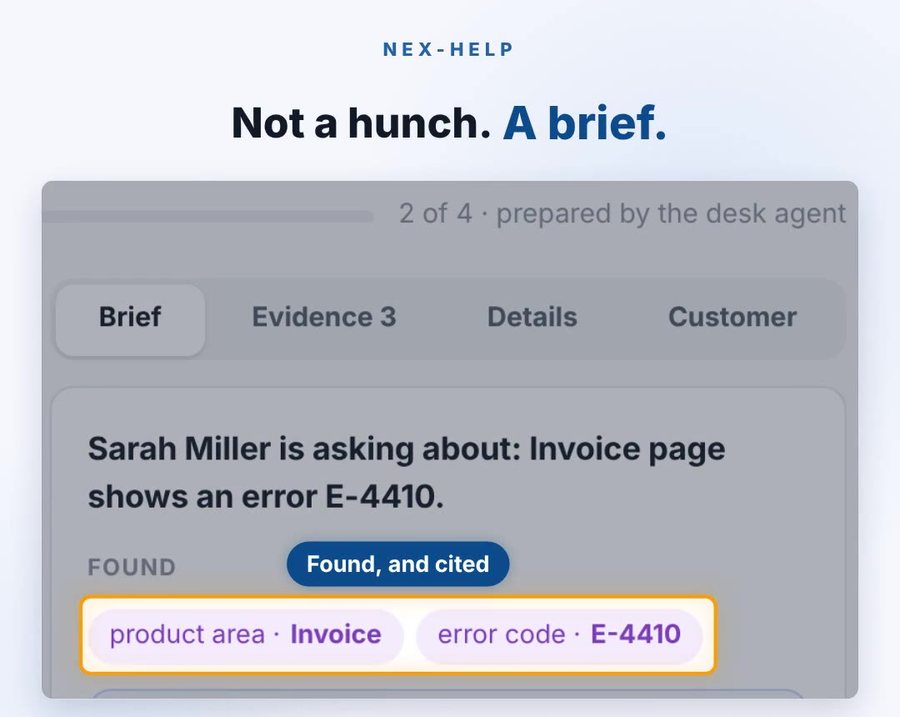
On Tuesday morning HLP-214 is under Needs you for Emily, who leads support. She approves the first proposal. The ticket's Project is now the ordering site, and it follows the workflow Liam picked for that project. She approves the second, and a to-do appears in her Planner, due in 24 hours, with the note "From ticket HLP-214" and a link back. The ticket records that Emily made a task.
The fix itself is David's team's. Emily presses Put it on the project's board, and a task appears on the ordering site's board. In its details it says it Came from Ticket HLP-214, which opens the ticket. David's team picks it up the way they pick up any task, and on the ticket, under On the project's board, Emily can see it move from To plan to In progress without asking anybody.
In the reply box: "Draft ready — press Tab to use it." Emily presses Tab, changes one sentence, and sends it. Sarah's email says it was AI-drafted and approved by Emily Hart.
On Wednesday morning Emily opens Standup. HLP-214 is in her draft, marked Support · HLP-214, and when she shares, it goes to the support desk's standup only. The support team's page has a Tickets section under Needs attention, and on her Home page, Waiting on you shows what is due soon, overdue or needs her input.
Sarah replies on her Your requests page, from the link in Emily's email: "Thanks. Will it be fixed before Saturday? It's our busiest day." Emily cannot answer yet, so she presses Remind me on Sarah's reply and chooses Tomorrow morning. On Thursday the to-do brings her straight back to it, the fix is out, and she replies.
That afternoon a second bakery reports the same error. Emily uses Link a ticket as the same problem…, picks HLP-214, and presses Use its answer. A second customer is answered in minutes, still with a person approving the reply.
Why there are other help desk and project tools, and what they miss
Teams use a separate help desk and a separate project tool for good reasons. Each is built for its job, and a connector can copy a ticket into a task.
What they miss is the rest of the day around the ticket:
- A connector copies, but the copy does not know the customer's projects, the person's standup or their reminders. In Nexcubator the ticket, the Planner, the standup and the project share one set of people and one sign-in.
- A help desk bot often replies on its own. nex-help's desk agent reads and proposes but never sends; a named person approves, and the customer can see who.
- A project tool's client portal and a help desk's request page are often two places for the customer to look. In Nexcubator a customer can ask on a shared project task or on their requests page, and each lands in front of the person who should answer it.
The rest of this post explains the ideas underneath.
Concept 1: The ticket knows its project
The idea: a ticket should be handled the way its customer's work is handled, by the people who know it.
On the support desk, a customer's page has How their tickets are worked: a lead picks the workflow and links the customer's projects. On a ticket, the Details tab has a Project field that offers only that customer's linked projects. The ticket's workflow can come from that project, and the desk agent can propose Put it in the project…, which happens only when a person approves.
Concept 2: From a ticket to someone's day
The idea: a ticket only gets solved when it becomes somebody's work today.
- Put it on the project's board makes a task on the board of the ticket's project, linked both ways: the task says it came from the ticket and opens it, and the ticket lists the task and where it stands now.
- Make a task in Scheduling makes a to-do in your Planner, due in 24 hours, with "From ticket HLP-…" and a link back. The ticket records who made it. The desk agent can propose it, and it is made only when a person approves.
- Remind me on a ticket or a reply makes a private to-do that takes you back to it.
- Your standup draft includes tickets you worked on, marked Support, and shares them only with the support desk's standup.
- Home shows Waiting on you: due soon, overdue and needs your input.
- Chat: a new ticket can post a card to the support desk's channel, with Take it and Open, so somebody owns it in seconds.
Concept 3: AI drafts, a person decides
The idea: the desk agent does the reading; a person does the deciding.
The desk agent reads a ticket, gathers what it can find, cites it, drafts a reply and proposes next steps. It never sends, and it works within a daily budget. In the reply box its draft waits until you press Tab, and you can change every word. The email that goes out says it was AI-drafted and who approved it.
Concept 4: Back to the customer
The idea: the customer should never have to chase.
- Your requests: the customer's own page, from the link in your email, where they read the thread and reply. The link lasts 30 days, and they can ask for a new one by email.
- Same problem, one answer: Link a ticket as the same problem… connects two tickets, and Use its answer starts the reply from the one already solved. Unlink if it turns out not to be.
- Service clocks: each ticket has a first response and a resolution clock. Severity S1 to S4 sets the priority, from Urgent to Low, and S1 and S2 tickets alert at night.
What it does not do yet
We would rather say it than have you find it:
- The ticket itself is not a card on the board. Its work is: a task you put there, linked both ways. The conversation with the customer stays on the ticket.
- Two customer lists. The support desk's customers and the customers in Projects are separate records today, even when they are the same company.
The principle underneath: the person is the bridge, and is never left alone
- Hand-overs that leave a trail. Every task made from a ticket links back, and every ticket records who made it.
- Promises kept where they were made. Remind me sits on the reply that asked the question.
- AI drafts, people decide. Nothing reaches a customer until a named person approves it.
Frequently asked questions
Does a support ticket appear on the project board?
Its work does. Put it on the project's board makes a task that says it came from the ticket and opens it, and the ticket shows where that task stands. The conversation with the customer stays on the ticket.
Can the AI reply to a customer on its own?
No. The desk agent reads and proposes but never sends. A named person approves every reply, and the email says who.
Will support work show up in our team's standup?
Yes, for the people who work on it. A ticket appears in their standup draft marked Support and is shared only with the support desk's standup, not with the project teams.
Are the customers in the help desk the same as the customers in Projects?
Not yet. They are separate records today, even for the same company.
Do I need both nex-help and nex-orbit?
No. Each works alone. Together, a ticket can follow its project's workflow, and support work shows in the same standup, Planner and Home as the rest of your day.
The nex-orbit series
- Stop Chasing, Ask the Project: nex-orbit
- Plan, Sprint, and See What Really Happened
- A Standup Drafted From Your Work, and Lessons That Come Back
- From a Customer's Ticket to Your Team's Day: nex-orbit With nex-help (you are here)
Related reading
- The Intelligent Help Desk: nex-help, where agents prepare and people approve.
- Help desk and ticketing software: how nex-help fits with the customer and the work.
- Projects and work: the nex-orbit feature page.
Where it stands
nex-orbit is available in the beta now. nex-help is in early beta with selected organisations.
If your help desk and your projects are two islands with a chat in between, start there. That is exactly the conversation we want to have.
Nexcubator is business software by Aitina Tech. Request early access and tell us how a customer's problem reaches your team today.
Nexcubator is built on two Aitina Tech frameworks: Software as a Capability and OKL. The engineering practice behind posts like this one is AI harness engineering.
This is the product it came out of.
Nexcubator runs jobs, people, time and money in one place, hosted in the EU or in your preferred region. Free during early access.
Request early access More posts