 Nexcubator
Blog · 20 September 2026 · 11 min read
Tired of Clicking, Filtering and Sorting? Flip It.
Every business screen is the same screen. Filter, sort, hide a column, scroll. It has looked like that for thirty years, and every one of them makes you do the translating: it shows you rows, and you work out what they mean. Then somebody asks "so what does it say?" and you start typing.
This post is about the idea that turns that around, and about what it removes from your business: the report request, the export, the change ticket, and the wait for IT to build the question before you are allowed to ask it.
In one line: one screen serves every person who looks at it, in their own terms, under their own permissions, and nobody has to build anything to make that happen. The rest of this post is how, and why that is not a feature but a different way of building software.
What nex-flip does
Every list in Nexcubator, as each module ships, carries one extra control: the Flip-it button, View ⇄ Brief. Press it and the screen you just built, the filters, the sort, the columns you kept, the one you widened, turns over into a brief in plain English. What is on it, what stands out, and what it is deliberately not talking about because you hid those columns.
Now turn it the other way. Tell it what you want to see, only the stuck ones, group by owner, make the due date bigger, and the list rearranges itself, exactly as if you had clicked. Spoken or typed, everyday phrasings are mapped onto the nine words the toolbar already knows: show, hide, only, unfilter, group by, ungroup, sort by, emphasise, reset. Ask for something outside those nine and it tells you which words it does know, instead of guessing.
That is the whole trick. Your screen was already a question. nex-flip just stops throwing the question away. The moment you have a view, you have a prompt, and the assistant can read it. "Why is this taking so long?" gets a paragraph. "Show me only the late ones" gets a filter. One screen, two directions.
No dashboards to design. No report builder. No export to Excel and think about it later. Your data, turned into a conversation, one flip at a time.
One screen, four people, no ticket
Here is the part to get excited about, because it is where the money is.
Take one list, made up for this post: the open jobs in a small firm. Four people look at it this week, and it means something different to each of them.
- The operations manager wants to know what is stuck. She says only the waiting ones, sort by days in stage and presses Brief. The screen writes her Monday update: eleven open, three waiting on somebody else, the longest nineteen days on a solicitor. She reads it to the room. It matches the table on the projector because it is the table, in words.
- The finance lead wants the same jobs by money. Group by customer, emphasise the cost. Same list, and now it is a margin report with the cost column leading and the brief opening on the total.
- The account manager wants what is late for her clients. Only the overdue ones, hide estimate, show waiting on. Same list, now a call sheet.
- The new starter wants his week. Only mine. Same list, now a to-do list. And when he tries show cost, the screen tells him, by name, that cost is not in his view. His manager's sentence rebuilt on his screen would drop it too.
Four reports, four meanings, four sets of permissions, from one screen. Now the question that matters:
What did the IT team do to make that possible? Nothing. Nobody redesigned a screen. Nobody built a report. Nobody added an endpoint to the backend for "jobs by customer with cost" or "overdue by account manager". No one raised a change request, waited for a sprint, or exported to Excel to bridge the gap. The screen itself was the request the system understood, and the system answered it.
This is what it means for a screen to be capable rather than merely built. A built screen answers the questions its designer imagined. A capable screen answers any question in its vocabulary, for anyone, with their permissions applied where the pixels are drawn. The difference is not cosmetic. It is the difference between a business that queues for its own information and one that asks.
And because the question and the answer stay together, the sentence is kept beside every brief and every table, anyone can see later exactly how a number was arrived at. Not a screenshot, not a reconstruction from logs. The sentence.
Questions move. Menus do not.
Why could four people get four reports with no ticket? Because of what the screen sends when you act on it. This is a business problem before it is a technical one.
Traditional software is built by guessing, at design time, which questions people will ask, and building a menu of screens and reports to answer them. Every question outside the menu becomes one of four things: an export, a workaround, a change request, or a question that never gets asked. The business changes every month. The menu changes when the supplier's next release ships.
nex-flip removes the guessing. The view is the question, written in nine words the whole platform speaks, and it goes to a capability that answers any sentence in those nine words. A new question is not a new screen. It is a sentence nobody had said yet.
| What the business needs | The old way | With nex-flip |
|---|---|---|
| A new report | A change request, then a release | Shape the list, press Flip-it |
| The same data for a different audience | A second report, or a copy in Excel | Hide, emphasise, flip |
| An answer in a meeting | Someone reads the screen and paraphrases | The brief, read aloud |
| The same view on a colleague's screen | A screenshot, or a saved view that ignores their permissions | One sentence, rebuilt under their permissions |
| Speech or an AI assistant | A separate project with its own risks | The same nine words, the same boundary |
| Proof of who saw what | Reconstruct from logs | Read the sentence kept as the receipt |
What we did first
nex-flip did not come first. Before it, we wrote a design standard for each family of screen Nexcubator actually has: the shell every module sits inside, the list with its toolbar, its six filter types and its three empty states, the board, and the calendar grid. Every list in the platform is built the same way and behaves the same way, whichever module it belongs to. No module invents a seventh filter type or its own empty state.
nex-flip exists because of that. Nine verbs can only drive every list if every list is standard. After standardising the screens, Aitina Tech's R&D wing built something we have not seen elsewhere: a list you can turn over.
The loop, and why it matters more than the trick
Here is what actually happens when you click, drag or speak.
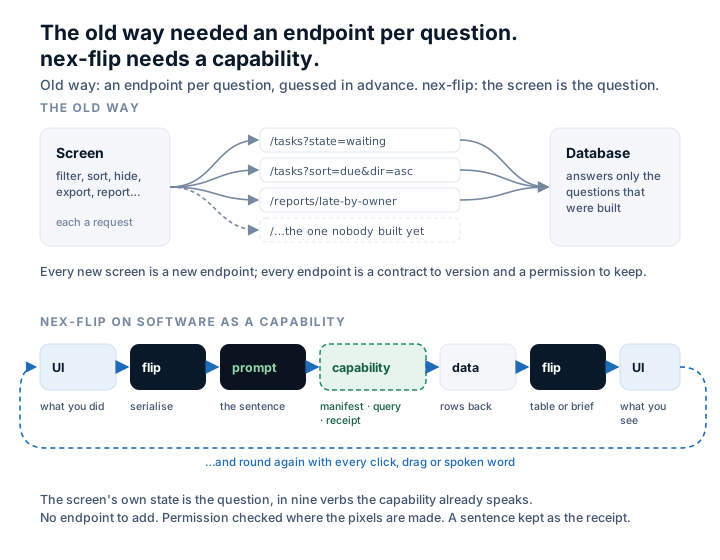
The list never filters its own rows. Your action changes its state; the state is flipped into one short sentence; the sentence goes to a capability, which checks it against what you are allowed to see, rebuilds the query from the sentence alone, and sends the rows back; the same sentence is flipped the other way into a table or a brief. Round again with every click.
Read that once more and notice what is missing. There is no endpoint per question, and there is no screen per audience. The capability still has a surface, as every capability does: MCP for agents, REST or gRPC for services. But nobody wrote /tasks?state=waiting&sort=due, nobody will have to write /reports/late-by-owner next quarter when somebody asks for it, and nobody will design a "finance view" of a screen that already exists. The sentence carries every question the view can ask, so when the business changes its questions, neither the interface nor the backend has to change with it.
Why the old way needed an endpoint per question
An API built the old way is a menu of questions somebody guessed in advance. That worked when screens were fixed and questions were few. It stopped working the day your people started asking questions the menu did not have, and it is the reason your organisation does three things it should not have to:
It exports to Excel. Not because Excel is good at this, but because it is the only place the question you actually have can be asked. Every spreadsheet on a shared drive is an endpoint somebody needed and nobody built.
It runs integration projects. Two systems, two menus, and a contractor writing the glue between them, then versioning that glue when either menu changes. The sprawl post counted what that costs a small business. It is not small.
It keeps permissions in three places. The screen hides the salary column. The API checks the role. The report builder has its own idea. Three boundaries drift apart, and the one that leaks is always the one nobody was looking at.
None of this is anybody's fault. It is what you get when the question and the answer live in different vocabularies and a human, or an integrator, has to stand between them.
Why Software as a Capability fits the loop exactly
Aitina Tech's Software as a Capability, SaaC, is the framework Nexcubator is built on. The short version: you do not buy an application and count seats. You hire a capability, a slice of competence the business needs, and every action it takes leaves a receipt. It has a manifest (what it does, for whom, and what it may show them) and it is priced by what it does, not by who logs in.
Look at the loop again and the fit is not a coincidence. A capability already speaks in sentences about what it will do; the flipped view is exactly such a sentence. A capability already carries a manifest of what each person may see; that manifest is exactly what the sentence is checked against before a single pixel is drawn. A capability already settles every action with a receipt; the sentence is the receipt: what was asked, by whom, against which manifest, and what came back.
For the person running the business, that turns into five things you can put a number on:
- Nothing to integrate, ever. Every capability speaks the same nine verbs about its lists, so any list in the platform can be flipped, spoken to, or handed to the assistant without a connector, an endpoint or a project. The how it works page follows one week of work through the whole platform without a single integration step; this is why.
- One permission boundary. The sentence proposes; the boundary disposes. Whether the request came from a click, a spoken word or an AI model, it crosses the same check at the same place, where the pixels are made. There is no second path to leak through.
- Audit by reading, not reconstructing. When the auditor, the client or the tax authority asks how a number came to be shown to whom, the answer is a sentence in English kept beside the answer, not a screenshot and not a log somebody has to interpret.
- No report builder, no dashboard project. The view is already the report. Widen the column that matters, hide the ones that do not, flip. The brief writes itself from the same state as the table, so the two can never disagree.
- Speech and AI arrive for free, and stay safe. Because the vocabulary is closed and refusals are by name, letting people talk to a screen is not a risk decision. And because the assistant is handed the same sentence rather than a picture of your screen, it answers about what you can see and nothing else.
What it is not
It is not "the software understands you". It knows nine words, and that is the point: nine words fit on a card, teach in a minute, and refuse precisely. A model that understands anything cannot tell you what it will not do, and a screen that might do anything is a screen nobody will let speech drive.
It is not an AI feature bolted on. The nine verbs are rules, not a model. The model is only asked when you ask a question the verbs cannot answer, and it is asked with the sentence, never a screenshot.
It does not delete anything. The vocabulary describes views, not data. There is no verb that changes a record, so nothing said to a list can destroy anything.
Where this goes
Every module we are specifying from here on carries the same one-sentence requirement: the list flips. Hours, approvals, invoices, customers, people: each list arrives already speaking the nine verbs, already checked by the same boundary, already leaving the same receipts. That is what building on a framework buys you: the pattern is built once and every capability inherits it.
It also sits inside a wider movement. The agent-to-interface standards now emerging all share one rule: an agent describes what it wants, and the client renders it only from a trusted catalogue of components, never from free code. nex-flip takes the same rule and applies it from the screen's side. The screen describes itself in a closed vocabulary, the capability answers only from what the manifest allows, and every answer carries a receipt.
The claim that the brief and the view can never disagree is a test, not a slogan. It runs today against the pattern's reference implementation: two thousand random views, each said in the vocabulary, rebuilt from the sentence alone and said again, none lost, on three different lists. As each module ships, the same test becomes a gate in its build.
The line we use for it is where words and UI components understand each other. Or, shorter: flip it.
Nexcubator is built in Ireland by Aitina Tech on two frameworks of its own, Software as a Capability and OKL. nex-flip is the framework every module renders its lists through; Flip-it is the button, and the verb, that turns a screen over.
Nexcubator is built on two Aitina Tech frameworks: Software as a Capability and OKL. The engineering practice behind posts like this one is AI harness engineering.
This is the product it came out of.
Nexcubator runs jobs, people, time and money in one place, built and hosted in the EU. Free during early access.
Request early access More posts